GM GUIDE
Gamemaster — Administration & Controls
1. The GM View
The GM sees the full game board as a spectator with admin controls. You have no circle on the board and do not participate directly in gameplay.
Your view is unrestricted at all times:
- During the Pregame practice phase, you can see all OD players and all team circles, even though color team players cannot see OD or each other during this phase.
- During live play, you see the entire board — all circles, star position, cooldown states, and player labels.
To the left of the board you have the Invite Codes panel and Player panel, described below. Control buttons appear above the board.
2. Invite Codes Panel
The Invite Codes panel shows the current access code for every team and for OD. Distribute these to players before the game begins — each team gets only their own code.
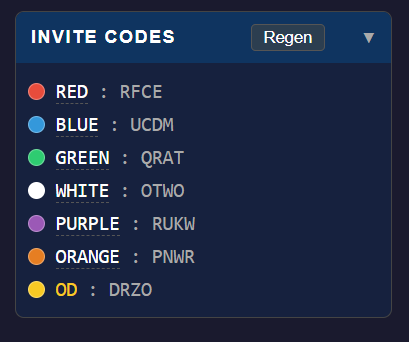
Regenerate Codes
Clicking Regenerate Codes immediately replaces all current codes with new ones. The old codes stop working instantly. Players who have already joined are not affected — only those who haven't connected yet need the new code.
Renaming Teams
Click on any team name in the panel to edit it inline. Custom names appear in the player list and on the board for all players. Names can be up to 16 characters. Use this to organize teams around player group names, roles, or departments.
Enabling and Disabling Teams
The colored dot to the left of each team name controls whether that team is active. Click a dot to disable that team — its invite code will stop working and the team's circle is removed from the board. Click the dot again to re-enable it.
- Teams can only be disabled during Pregame.
- A team with active or pending players cannot be disabled — kick those players first.
- Teams can be re-enabled at any time, including during a live game.
3. Player Panel
The Player panel gives you a detailed view of everyone connected — including players who have joined mid-game and are waiting to be placed.
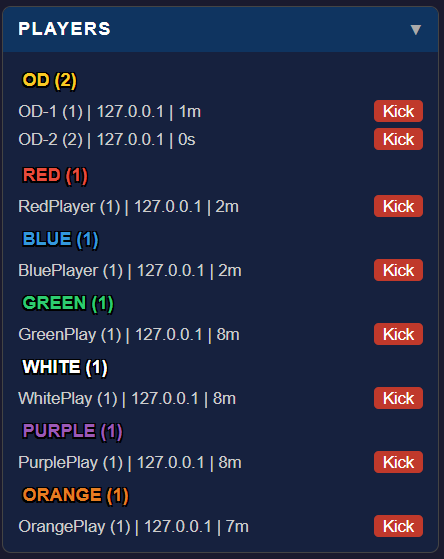
Inactivity Timer
Each player row shows an idle timer — how many seconds have passed since that player last pressed an arrow key. This is useful for identifying AFK players or anyone who may have silently disconnected but still appears in the list. A high idle time during active play is a signal that something may be wrong on their end.
Pending Players
Players who join while a game is in progress are placed in a Pending queue, shown at the bottom of the player panel. They are assigned to their team at the next pause or reset. Pending players can be kicked before they are placed.
Kick
Clicking kick immediately removes that player from the game. They receive a notification on their screen that includes their team's invite code, so they can rejoin without having to ask you for it again.
If the kicked player held the star, the game will briefly enter the Star Lost phase, then recover automatically.
4. Game Controls
As GM, you have the same game control buttons as OD players. These work identically.

From Pregame: begins the 60-second Starting countdown. Requires at least one OD player to be connected.
From Pause: resumes live gameplay.
Immediately suspends the game. Queued pending players are placed into their teams on pause. Use this to manage the game, resolve issues, or allow a late joiner to catch up.
Skips to a fresh 10-second countdown, locking all OD circles in their current positions. Use to quickly replay with the same OD formation, or to bypass the 60-second Starting phase.
Returns to the Pregame practice phase. Everyone can move freely again. Use this between rounds when OD wants to change their starting formation.