1. Objectives
Starhold is a team-based game played on a hexagonal board with two sides competing against each other.
Color Teams — Red, Blue, Green, White, Purple, Orange
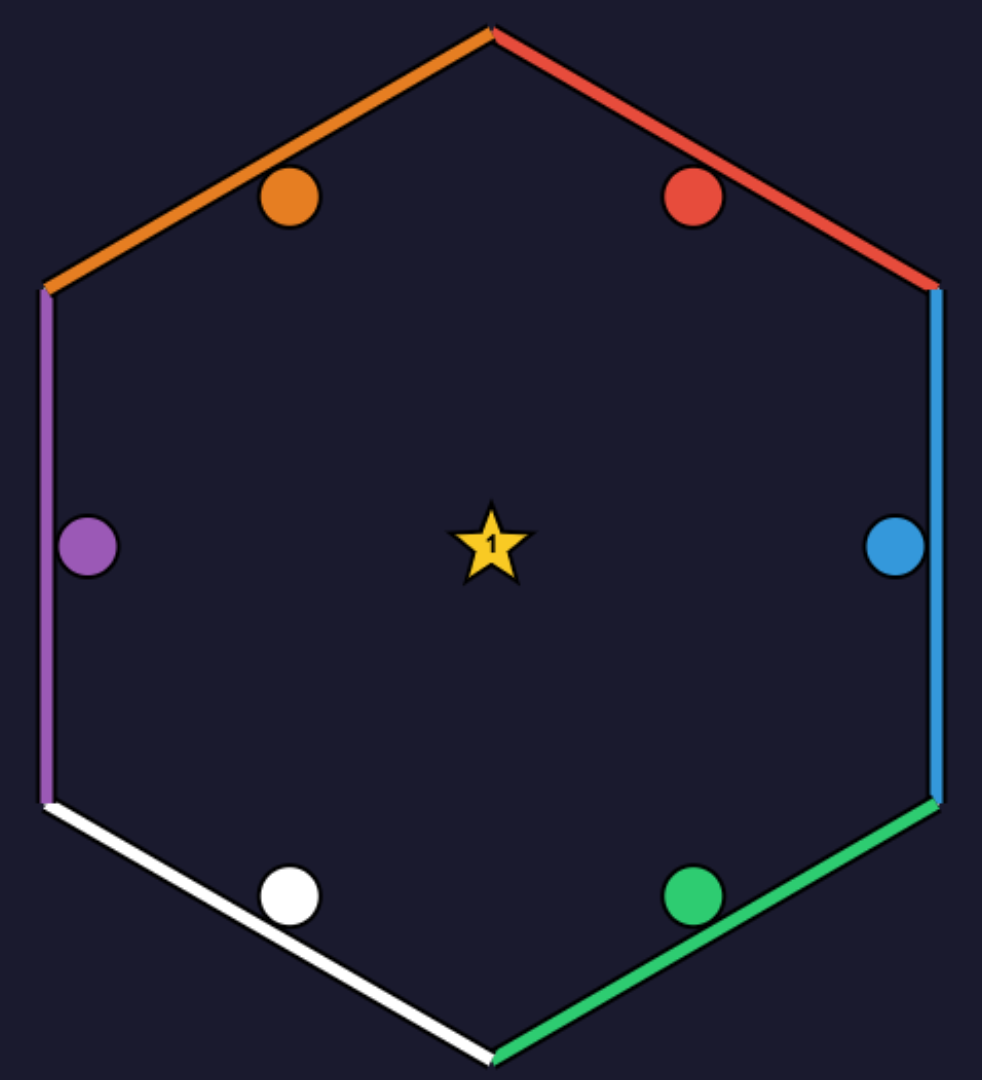
Each color team controls a single circle that starts at their goalpost — the matching colored side of the hexagon. The goal is to be the first team to cross their goalpost while in possession of the star. Only one team can win.
On Defense (OD)
OD players work together to prevent any color team from scoring for as long as possible. There is no time limit — OD wins by defending indefinitely. The longer they hold out, the more impressive their victory.
2. Joining the Game
Go to the game page and enter the following on the join screen:
- Username — up to 10 characters. Visible to you, your teammates, and the GM.
- Invite code — a 4-letter code provided by your GM. Not case-sensitive. This determines which team you join.
Each team has its own unique invite code, including OD. Your GM distributes these before the game begins.
3. Controls
All players use the arrow keys to move.
OD Players
Each OD player controls their own individual circle independently. Your movement is yours alone.
Color Team Players
All players on a color team collectively control a single shared circle. Everyone's arrow key inputs are averaged together and divided by the team size. To move effectively, your entire team must coordinate and press the same direction at the same time.
Larger teams are harder to coordinate — but this comes with a significant advantage: as the game goes on, larger teams benefit from shorter cooldown timers compared to smaller teams. See Cooldown Timers for details. Team size is a core strategic decision.
4. The Game Board
The board is a hexagon. Each of the six sides belongs to one color team — that side is their goalpost. Teams start their circle just inside their goalpost at the edge of the board. To score, a team must push their circle back across that same side while holding the star.
OD starts in the center of the board. OD begins the game in possession of the star and may choose their exact starting position during the pregame practice phase (see Game Progression and the OD Guide). When an OD player holds the star, their circle changes to a star shape on screen.
5. Star Capture & Tackling
All circles are solid objects — no circle can ever pass through another, even while inactive. When two circles make contact, the outcome depends on who is involved and whether either one holds the star.
OD ↔ OD

Star transfers to the other OD player. No penalty to either.
Cross-team + Star

Star transfers to receiver. Star loser becomes inactive. Receiver: no penalty.
Cross-team, No Star
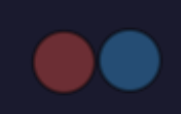
Both players become inactive. No star transfer occurs.
6. Inactivity
When a circle becomes inactive (frozen), the following applies:
- If they were holding the star, star possession is immediately lost. It transfers to the player who caused the tackle (or is dropped if the tackle did not involve a receiving player).
- The circle becomes semi-transparent, visually signaling that it cannot act.
- The circle cannot move for the duration of the cooldown timer.
- While inactive, the circle does not incur any further penalties from contact with other circles.
- Other circles do not receive a penalty for touching an inactive circle — though they are still blocked by it physically.
Cooldown expires automatically. When it does, the circle becomes fully opaque and control resumes with no action required.
7. Cooldown Timers
Cooldown timers determine how long a circle remains inactive after being tackled.
- First 10 seconds of gameplay: all players share a flat 2-second cooldown.
- After 10 seconds: a base cooldown timer begins to ramp up gradually as the game continues — the longer the game runs, the longer cooldowns become for everyone.
OD
OD players always use the base cooldown — it is not scaled by team size.
Color Teams
Each color team's cooldown is scaled based on their team size relative to other teams:
- The largest team has the cooldown closest to the base cooldown (shortest).
- Smaller teams face progressively longer cooldowns.
This makes team size a core strategic consideration. A larger team is harder to coordinate, but benefits from much shorter downtime after tackles as the game goes on. A smaller team is easier to direct, but suffers longer penalties — and those penalties grow faster over time.
8. Game Progression
The game moves through several phases. The current phase is always shown on screen.
| Phase | What's happening |
|---|---|
| Pregame shown as "Practice" |
A free-movement warm-up phase before the game. OD can position themselves and pass the star. Color team players can practice moving their circle against a practice star (visible only to them). No tackling penalties apply. No scoring. |
| Starting | Initiated by OD or the GM. A 60-second countdown begins, shown on screen. Everyone can still move freely. This window is for finalizing positions before the game locks in. |
| Countdown | A 10-second lock-in. All circles freeze in place. The star is assigned to the first OD player. A countdown is displayed on screen. The game goes live when this countdown reaches zero. |
| Playing | Live gameplay. The game timer counts up in the top area of the screen. Tackles, star transfers, cooldowns, and scoring are all active. |
| Paused | The game is suspended by the GM or an OD player. All movement and timers pause. Any players queued from late joining are added to the game when play resumes. |
| Star Lost | The star holder disconnected mid-game. The game recovers automatically — after a brief moment, the game resumes. |
| Ended | A color team crossed their goalpost while holding the star. A victory screen displays the winning team and the total game time that OD defended. |
9. Cooldown Timer Panel
The Cooldown Timer Panel is on the right side of the screen. It shows the current cooldown duration for each team and for OD, updated in real time during gameplay.
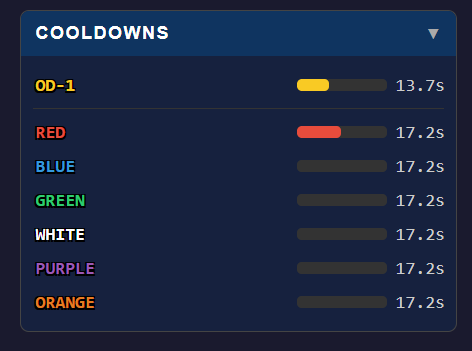
This panel only shows live values during the playing, paused, and Star Lost phases. At all other times it will read "Active during game."
10. Player List Panel
The Player List appears below the Cooldown Timer Panel. It shows all currently connected players, grouped by team.
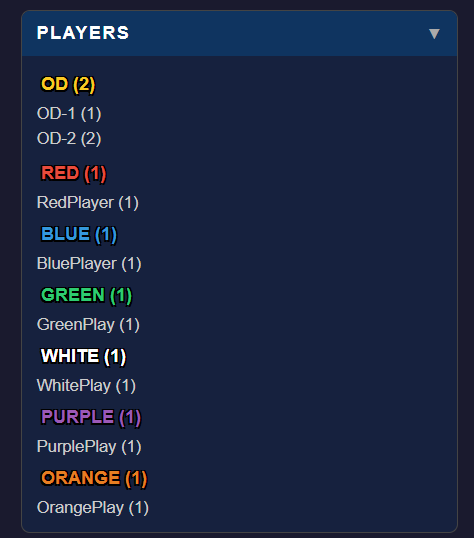
Each entry shows the player's username and their player ID in parentheses. OD players are numbered OD-1, OD-2, etc.; color team players are numbered 1, 2, 3, etc. within their team. The list updates automatically as players join or leave.
11. Music Controls
Background music plays while you are in the game view. It starts muted by default — Starhold is often played in environments where audio would be disruptive.
A mute / unmute button is located in the top area of the game view. Click it at any time to toggle audio on or off.
12. Fine Points
Admin Pausing
The GM and any OD player can pause the game at any time during active play. When paused, all movement and timers freeze. The game resumes from the same state when unpaused.
Late Joining
If you join after the game has already started, you are placed in a queue. Your circle is added to the game at the next pause or reset — your cooldown timer will be adjusted so you are not disadvantaged relative to players who have been in since the start. Until you are placed, you can spectate the live board.
Kick and Rejoin
When a player is kicked by the GM, they receive a notification containing their team's invite code. This lets them rejoin the same team without having to ask the GM for the code again.
Star Holder Disconnect
If the player holding the star disconnects, the game briefly enters the Star Lost phase. The game recovers automatically and play resumes shortly after.